How To: Экспорт прайс-листа в Excel
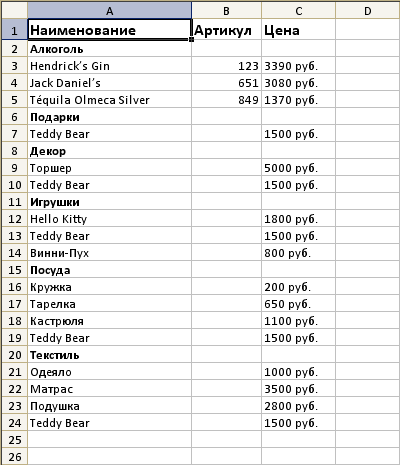
Для автоматической генерации прайс-листа в формате Excel необходимо загрузить PHPExcel и распаковать его в корневую директорию.
Обновите код настроек ТДС "Прайс" на следующий:
<?php

$oShop = Core_Entity::factory('Shop', Core_Array::get(Core_Page::instance()->libParams, 'shopId'));

$Shop_Controller_Show = new Shop_Controller_Show($oShop);

$path = Core_Page::instance()->structure->getPath();

$Shop_Controller_Show
	//->pattern(rawurldecode($path) . '({path})(page-{page}/)')
	->pattern(rawurldecode($path) . '({path})({xls})(page-{page}/)')
	->patternExpressions(array(
		'xls' => 'xls\/'
	))
	->addEntity(
		Core::factory('Core_Xml_Entity')
			->name('path')
			->value($path)
	)
	->limit(500)
	->parseUrl();

// Генерация Excel прайса
class HostCMS_Excel extends Core_Servant_Properties
{
	/**
	 * Allowed object properties
	 * @var array
	 */
	protected $_allowedProperties = array(
		'title',
		'filename',
	);

	/**
	 * excelObject
	 * @var object
	 */
	protected $_excelObject = NULL;

	/**
	 * excelSheetObject
	 * @var object
	 */
	protected $_excelSheetObject = NULL;

	/**
	 * excelWriterObject
	 * @var object
	 */
	protected $_excelWriterObject = NULL;

	/**
	 * Shop_Model
	 * @var object
	 */
	protected $_shop = NULL;

	protected $_cell = 2;

	/**
	 * Constructor.
	 */
	public function __construct($objPHPExcel, Shop_Model $oShop)
	{
		parent::__construct();

		$this->_excelObject = $objPHPExcel;

		$this->_shop = $oShop;

		$this->title = 'price';
		$this->filename = 'file';

		// set default font
		$this->_excelObject->getDefaultStyle()->getFont()->setName('Calibri');

		// set default font size
		$this->_excelObject->getDefaultStyle()->getFont()->setSize(10);

		// writer already created the first sheet for us, let's get it
		$this->_excelSheetObject = $this->_excelObject->getActiveSheet();

		// create the writer
		$this->_excelWriterObject = PHPExcel_IOFactory::createWriter($this->_excelObject, "Excel5");

		// autosize the columns
		$this->_excelSheetObject->getColumnDimension('A')->setAutoSize(TRUE);
		$this->_excelSheetObject->getColumnDimension('B')->setAutoSize(TRUE);
		$this->_excelSheetObject->getColumnDimension('C')->setAutoSize(TRUE);
	}

	/**
	 * File output.
	 */
	public function output()
	{
		// rename the sheet
		$this->_excelSheetObject->setTitle($this->title);

		// write header
		$this->header($this->_excelSheetObject);

		$aShop_Groups = $this->fillShopGroup($this->_shop->id, 0);

		foreach ($aShop_Groups as $iShopGroupId => $sShopGroupName)
		{
			$this->_excelSheetObject->getStyle('A' . $this->_cell)->getFont()->setBold(TRUE);

			$this->_excelSheetObject->getCell('A' . $this->_cell)->setValue($sShopGroupName);

			$this->_cell++;

			$this->items(intval($iShopGroupId));
		}

		// Setting the header type
		header('Content-Type: application/vnd.openxmlformats-officedocument.spreadsheetml.sheet');
		header('Content-Disposition: attachment;filename="' . $this->filename . '.xls"');
		header('Cache-Control: max-age=0');

		$this->_excelWriterObject->save('php://output');
	}

	/**
	 * Create header row.
	 */
	public function header($oSheet)
	{
		// let's bold and size the header font and write the header
		// as you can see, we can specify a range of cells, like here: cells from A1 to A4
		$oSheet->getStyle('A1:C1')->getFont()->setBold(TRUE)->setSize(12);

		$oSheet->getCell('A1')->setValue('Наименование');
		$oSheet->getCell('B1')->setValue('Артикул');
		$oSheet->getCell('C1')->setValue('Цена');

		return $oSheet;
	}

	/**
	 * Create items row.
	 */
	public function items($iShopGroupId)
	{
		$offset = 0;
		$limit = 100;

		$sCurrency = $this->_shop->Shop_Currency->name;

		$oShop_Group = $this->_shop->Shop_Groups->getById($iShopGroupId);

		$Shop_Item_Controller = new Shop_Item_Controller();

		if (Core::moduleIsActive('siteuser'))
		{
			$oSiteuser = Core_Entity::factory('Siteuser')->getCurrent();

			if ($oSiteuser)
			{
				$Shop_Item_Controller->siteuser($oSiteuser);
			}
		}

		if (!is_null($oShop_Group->id))
		{
			do {
				$oShop_Items = $oShop_Group->Shop_Items;
				$oShop_Items->queryBuilder()
					->where('shop_items.active', '=', 1)
					->offset($offset)
					->limit($limit);

				$aShop_Items = $oShop_Items->findAll(FALSE);

				foreach ($aShop_Items as $oShop_Item)
				{
					// Shortcut
					$iShortcut = $oShop_Item->shortcut_id;

					if ($iShortcut)
					{
						$oShop_Item = $oShop_Item->Shop_Item;
					}

					$aPrice = $Shop_Item_Controller->getPrices($oShop_Item);

					$price = Shop_Controller::instance()->getCurrencyCoefficientInShopCurrency(
						$oShop_Item->Shop_Currency,
						$oShop_Item->Shop->Shop_Currency) * $aPrice['price_discount'];

					$sPrice = $price . ' ' . $sCurrency;

					$this->_excelSheetObject->getCell('A' . $this->_cell)->setValue($oShop_Item->name);
					$this->_excelSheetObject->getCell('B' . $this->_cell)->setValue($oShop_Item->marking);
					$this->_excelSheetObject->getCell('C' . $this->_cell)->setValue($sPrice);

					$this->_cell++;
				}

				$offset += $limit;
			}
			while (count($aShop_Items));
		}

		return $this;
	}

	/**
	 * Shop groups tree
	 * @var array
	 */
	protected $_aGroupTree = array();

	/**
	 * Build visual representation of group tree
	 * @param int $iShopId shop ID
	 * @param int $iShopGroupParentId parent ID
	 * @param int $aExclude exclude group ID
	 * @param int $iLevel current nesting level
	 * @return array
	 */
	public function fillShopGroup($iShopId, $iShopGroupParentId = 0, $aExclude = array(), $iLevel = 0)
	{
		$iShopId = intval($iShopId);
		$iShopGroupParentId = intval($iShopGroupParentId);
		$iLevel = intval($iLevel);

		if ($iLevel == 0)
		{
			$aTmp = Core_QueryBuilder::select('id', 'parent_id', 'name')
				->from('shop_groups')
				->where('shop_id', '=', $iShopId)
				->where('deleted', '=', 0)
				->where('active', '=', 1)
				->orderBy('sorting')
				->orderBy('name')
				->execute()->asAssoc()->result();

			foreach ($aTmp as $aGroup)
			{
				$this->_aGroupTree[$aGroup['parent_id']][] = $aGroup;
			}
		}

		$aReturn = array();

		if (isset($this->_aGroupTree[$iShopGroupParentId]))
		{
			$countExclude = count($aExclude);
			foreach ($this->_aGroupTree[$iShopGroupParentId] as $childrenGroup)
			{
				if ($countExclude == 0 || !in_array($childrenGroup['id'], $aExclude))
				{
					$aReturn[$childrenGroup['id']] = $childrenGroup['name'];
					$aReturn += $this->fillShopGroup($iShopId, $childrenGroup['id'], $aExclude, $iLevel + 1);
				}
			}
		}

		$iLevel == 0 && $this->_aGroupTree = array();

		return $aReturn;
	}
}

if (!empty($Shop_Controller_Show->patternParams['xls']))
{
	require_once(CMS_FOLDER . 'PHPExcel/PHPExcel.php');

	// create new PHPExcel object
	$objPHPExcel = new PHPExcel();

	$HostCMS_Excel = new HostCMS_Excel($objPHPExcel, $oShop);
	$HostCMS_Excel
		->title('Прайс ' . $oShop->name)
		->filename('price')
		->output();
	exit();
}
// /Excel

Core_Page::instance()->object = $Shop_Controller_Show;
Обновите код ТДС "Прайс" на следующий:
<?php

$Shop_Controller_Show = Core_Page::instance()->object;

$Shop_Controller_Show
   ->shopItems()
   ->queryBuilder()
   ->clearOrderBy()
   ->leftJoin('shop_groups', 'shop_groups.id', '=', 'shop_items.shop_group_id')
   ->where('shop_items.active', '=', 1)
   ->open()
   ->where('shop_groups.active', '=', 1)
   ->setOr()
   ->where('shop_groups.active', 'IS', NULL)
   ->where('shop_items.modification_id', '=', 0)
   ->close()
   ->clearOrderBy()
   ->orderBy('shop_items.shop_group_id')
   ->orderBy('shop_items.name');

$Shop_Controller_Show
	->shopGroups()
	->queryBuilder()
	->where('shop_groups.active', '=', 1)
	->clearOrderBy()
	->orderBy('shop_groups.id');

$xslName = Core_Array::get(Core_Page::instance()->libParams, 'xsl');

$Shop_Controller_Show
	->xsl(
		Core_Entity::factory('Xsl')->getByName($xslName)
	)
	->groupsMode('all')
	->itemsProperties(TRUE)
	->group(FALSE)
	->show();
Прайс-лист будет доступен по адресу http://ваш_сайт/shop/price/xls/
Комментарии
-
Добавить остаток на складе
Подскажите, как в выгружаемый файл XLS добавить столбец с остатками товара на складе?
Без темы
В аналогичных строчках нужно добавить:
$this->_excelSheetObject->getColumnDimension('D')->setAutoSize(TRUE);
///////////
$oSheet->getCell('D1')->setValue('На складе');
///////
$this->_excelSheetObject->getCell('D' . $this->_cell)->setValue($oShop_Item->getRest());


-
Без темы
а группы от подгрупп мы как то можем отделить?
или узнать их уровень?

-
Без темы
Постраничная навигация на самой странице Прайс не работает - каждый раз скачивается прайс при этом
-
PHPExcel - DEAD
на странице скрипта рекомендовано перейти на
https://github.com/PHPOffice/PhpSpreadsheet

-
не работает
всё сделал по инструкции но отдаёт пустую страницу.
это для какой версии? может для старых версий?Без темы
Решение для актуальных версий. Вероятно у вас какая ошибка при интеграции.
ошибка в коде
вероятно какой-то рукожоп писал код настроек тдс прайса. там путь на сервере до PHPExcel.php на правильно прописан и поэтому некорректная работа.
Без темы
В категориях рукожопов не разбираемся, вам лучше знать, насколько вижу, путь подключения явно указан: require_once(CMS_FOLDER . 'PHPExcel/PHPExcel.php');
Без темы
А Вы уверены в этом пути? "...загрузить PHPExcel и распаковать его в корневую директорию..." посмотрите собственную инструкцию.... или инструкцию установки скрипта по вашей ссылке... Как-то я нигде ни увидел упоминания директории PHPExcel...



-
Без темы
А возможно сделать ссылки в прайсе на сайт с каждой позиции ? На 5-ой версии по умолчанию все было. Как в данном случае добавить ?
-
Ошибка
После перехода по ссылке на сайте http://...ru/shop/price/xls/ появляется ошибка:
Предупреждение: require_once(/home/i/info11/christmas-spb.ru/public_html/PHPExcel/PHPExcel.php): failed to open stream: No such file or directory в файле /home/i/info11/christmas-spb.ru/public_html/hostcmsfiles/lib/lib_54/lib_config_54.php (строка 269) Fatal error: require_once(): Failed opening required '/home/i/info11/christmas-spb.ru/public_html/PHPExcel/PHPExcel.php' (include_path='.:/usr/share/php') in /home/i/info11/christmas-spb.ru/public_html/hostcmsfiles/lib/lib_54/lib_config_54.php on line 269